
Advertisement

 by Andso Mangis » Sun May 18, 2025 4:51 pm

by Tumbra » Wed Jun 04, 2025 7:21 am
Andso Mangis wrote:xscorinate doesn't work for me are their other ways to scorinate game
Graintfjall wrote:1. When you open it you should have a page like this:(Image)
2. Click on New Event on the left and choose your sport. For now I'll use Association Football, SQIS Formula. Choose the options you want such as home advantage on or off, and whether to use additive or multiplicative modifiers. (Additive formulas should always be used for international tournaments; multiplicative are OK for domestic ones.) Continue.(Image)
3. Set the Max skill (this matters more when using NSFS over SQIS) which is usually the max rank + the max RP bonus. For now let's use 50 for ease. Enter Participants with their rank (I've used my puppets with their approx KPB rank) and style modifiers. (You can ignore Teams; this is relevant only for multiple individual athletes from the same nation e.g. Bill, Bob, and Ben, who all represent the same nation in Figure Skating. For team sports, all you need is Participants.) Continue.(Image)
4. Under competition type, choose Individual Matches if you want single games e.g. friendlies, knockout rounds. Toggle Allow Draws accordingly. (Usually, friendlies allow draws, knockouts don't.) But instead, let's choose Round Robin. Choose the number of legs: 1 means they play each other once e.g. the group stage of most international football tournaments, 2 means they play each twice, etc. I've chosen 2 legs, so double round robin. Usually for group stages, Allow Draws is kept checked, but toggle accordingly. You don't need to check Results Grid. Choose your tiebreakers: you can change around the order, delete those you don't want, or add new ones. I've decided to remove Goals For, and move the Head to Head tiebreakers higher. If needed, you can also change the points, although 3/1/0 is the standard for soccer. Continue.(Image)
5. Set up your groups. You add a group using the big Plus button. You add an individual team to that group using the next button to its right.(Image)
Alternatively, you can add all participants using the middle button. The next button removes whichever participant you've selected (or, if you select a group, deletes that entire group); be careful as there's no Undo! Finally, you can randomize the order of teams in a group using the Dice button. Make sure the teams are put in the right order. For now I've put all teams in a single group and used the Dice button. Continue.(Image)
6. You now can start scorinating matches. By default Matchday 1 is selected, so click the Dice button and you'll get your results and a table.(Image)
You can scroll down through the Matchdays. If you want to scorinate all days in one go, you can go all the way down to Matchday 6 and scorinate that (e.g. if you're scorinating your domestic season, you might do it all in one day). If you do this, and then you rescorinate Matchday 1, you will lose the results for Matchdays 2 - 6 and need to rescorinate them. You can check results from past Matchdays from this menu.(Image)
7. Good results! I'd like to keep them. So let's give this competition a name by clicking on the pale bar on the left hand side.(Image)
I've called this the Awesome Cup.
8. To save the file, use the Save As button (Floppy disk + Pencil). Give it a name and it will be saved as a .xml file in the default folder such as Documents. To save the file again after you've modified it, use the Save button (Floppy disk).
9. To access a file you've previously used, use the Open button (Folder + sheet of paper). This should bring up the folder where you save your file, and you can begin editing it again.
by Andso Mangis » Thu Jun 05, 2025 4:48 pm
Tumbra wrote:Andso Mangis wrote:xscorinate doesn't work for me are their other ways to scorinate game
Hi! You're going to have to go into more detail as to how it doesn't work for you. Could you do that for us so we can help diagnose your issue? Alternatively, try following the instructions in this post, which I've quoted below. You can click on the green "wrote" text next to Graintfjall's name to access the original post.Graintfjall wrote:1. When you open it you should have a page like this:(Image)
2. Click on New Event on the left and choose your sport. For now I'll use Association Football, SQIS Formula. Choose the options you want such as home advantage on or off, and whether to use additive or multiplicative modifiers. (Additive formulas should always be used for international tournaments; multiplicative are OK for domestic ones.) Continue.(Image)
3. Set the Max skill (this matters more when using NSFS over SQIS) which is usually the max rank + the max RP bonus. For now let's use 50 for ease. Enter Participants with their rank (I've used my puppets with their approx KPB rank) and style modifiers. (You can ignore Teams; this is relevant only for multiple individual athletes from the same nation e.g. Bill, Bob, and Ben, who all represent the same nation in Figure Skating. For team sports, all you need is Participants.) Continue.(Image)
4. Under competition type, choose Individual Matches if you want single games e.g. friendlies, knockout rounds. Toggle Allow Draws accordingly. (Usually, friendlies allow draws, knockouts don't.) But instead, let's choose Round Robin. Choose the number of legs: 1 means they play each other once e.g. the group stage of most international football tournaments, 2 means they play each twice, etc. I've chosen 2 legs, so double round robin. Usually for group stages, Allow Draws is kept checked, but toggle accordingly. You don't need to check Results Grid. Choose your tiebreakers: you can change around the order, delete those you don't want, or add new ones. I've decided to remove Goals For, and move the Head to Head tiebreakers higher. If needed, you can also change the points, although 3/1/0 is the standard for soccer. Continue.(Image)
5. Set up your groups. You add a group using the big Plus button. You add an individual team to that group using the next button to its right.(Image)
Alternatively, you can add all participants using the middle button. The next button removes whichever participant you've selected (or, if you select a group, deletes that entire group); be careful as there's no Undo! Finally, you can randomize the order of teams in a group using the Dice button. Make sure the teams are put in the right order. For now I've put all teams in a single group and used the Dice button. Continue.(Image)
6. You now can start scorinating matches. By default Matchday 1 is selected, so click the Dice button and you'll get your results and a table.(Image)
You can scroll down through the Matchdays. If you want to scorinate all days in one go, you can go all the way down to Matchday 6 and scorinate that (e.g. if you're scorinating your domestic season, you might do it all in one day). If you do this, and then you rescorinate Matchday 1, you will lose the results for Matchdays 2 - 6 and need to rescorinate them. You can check results from past Matchdays from this menu.(Image)
7. Good results! I'd like to keep them. So let's give this competition a name by clicking on the pale bar on the left hand side.(Image)
I've called this the Awesome Cup.
8. To save the file, use the Save As button (Floppy disk + Pencil). Give it a name and it will be saved as a .xml file in the default folder such as Documents. To save the file again after you've modified it, use the Save button (Floppy disk).
9. To access a file you've previously used, use the Open button (Folder + sheet of paper). This should bring up the folder where you save your file, and you can begin editing it again.

by Tinhampton » Thu Jun 05, 2025 5:36 pm
by Andso Mangis » Thu Jun 05, 2025 5:38 pm
Tinhampton wrote:xkoranate works on all versions of Windows. It does not work on newer Macs.

by New Eastern Canada » Sun Jun 08, 2025 12:42 pm
by Andso Mangis » Sun Jun 08, 2025 2:07 pm

by Sel Appa » Sun Jun 08, 2025 9:28 pm
by Andso Mangis » Mon Jun 09, 2025 5:23 pm

by The Kytler Peninsulae » Sun Jul 06, 2025 1:18 pm
TLDR: the process
- Each team's rank is converted into Elo Above Replacement (EAR) - i.e. their advantage in Elo over a 0-rank team (for whom EAR is 0) - with a formula that has adjustable constants to determine the extent to which rank affects EAR and by implication win probabilities.
- The difference in EAR (and hence Elo) between the two teams - after accounting for home advantage if relevant - determines the share of win probability for each team using the standard Elo formula, and the winner is selected based on this (with an additional calculation to determine the probability of a draw).
- If the result is not a draw, the next step is to determine the winning margin, based on the win probability of the actual winning team; if it is a draw, the margin is 0, and there is a separate calculation for extra time if needed.
- Finally, the number of goals for the losing team is determined, based on the style modifiers of the two teams; the winning team score is the losing team score plus the margin (in the event of a draw, the margin is 0 and hence the "losing team score" and "winning team score" are the same).
- A modified version of the same process is applied to extra time if needed; penalty shootouts are rankless coinflips
by Northwest Kalactin » Tue Jul 08, 2025 10:03 am
The Kytler Peninsulae wrote:TLDR: the process
- Each team's rank is converted into Elo Above Replacement (EAR) - i.e. their advantage in Elo over a 0-rank team (for whom EAR is 0) - with a formula that has adjustable constants to determine the extent to which rank affects EAR and by implication win probabilities.
- The difference in EAR (and hence Elo) between the two teams - after accounting for home advantage if relevant - determines the share of win probability for each team using the standard Elo formula, and the winner is selected based on this (with an additional calculation to determine the probability of a draw).
- If the result is not a draw, the next step is to determine the winning margin, based on the win probability of the actual winning team; if it is a draw, the margin is 0, and there is a separate calculation for extra time if needed.
- Finally, the number of goals for the losing team is determined, based on the style modifiers of the two teams; the winning team score is the losing team score plus the margin (in the event of a draw, the margin is 0 and hence the "losing team score" and "winning team score" are the same).
- A modified version of the same process is applied to extra time if needed; penalty shootouts are rankless coinflips
by The Kytler Peninsulae » Tue Jul 08, 2025 2:37 pm
Northwest Kalactin wrote:Unsure as to how much my opinion actually matters to this community on the issue of scorinators anymore, but add my name to what I'm sure is already a long list of endorsements for this formula.
I think the idea of using the EAR as a mathematical benchmark for scorination is brilliant, and in my opinion, is superior to both the NSFS and SQIS formulas.
NSFS compares the ranks of each team to a max rank, which is set by the host on xkoranate (typically the highest rank + RP bonus). This works well when you have a team that is highly ranked, and therefore close numerically to the max rank; however, it induces randomness when you have two lower or mid-ranked teams, as differences in rank become negligible when compared to a team with a top-5 KPB earning max RP bonus each match day.
SQIS, on the other hand, compares the ratios of the two teams. This allows each team to be compared directly to their opponent, reducing arbitrary randomness; however, it theoretically would play a 50-25 KPB difference the same as a 2-1 KPB difference. While I personally do not believe this is a pressing issue (and the 'randomness' of SQIS has been debunked numerous times), it does have more randomness than NSFS for higher-ranked teams.
The LISA formula seems not to suffer from either of these issues. While, admittedly, I do not fully understand all the math (though KP seems entirely competent on this issue, and I have no doubts he rigorously tested this aspect of the scorinator well), the formula looks very strong, and I am excited to see what it potentially turns into in the future.

by Quebec and Shingoryeo » Tue Jul 08, 2025 3:59 pm

by Epic bannana » Mon Sep 01, 2025 12:02 am
by Andso Mangis » Thu Sep 04, 2025 4:37 am
Epic bannana wrote:are there any scorinators that you can do online like league simulator?

by Ko-oren » Mon Sep 15, 2025 5:49 am
by The Kytler Peninsulae » Mon Sep 15, 2025 10:20 am


by Jiangbei » Wed Oct 08, 2025 1:16 am
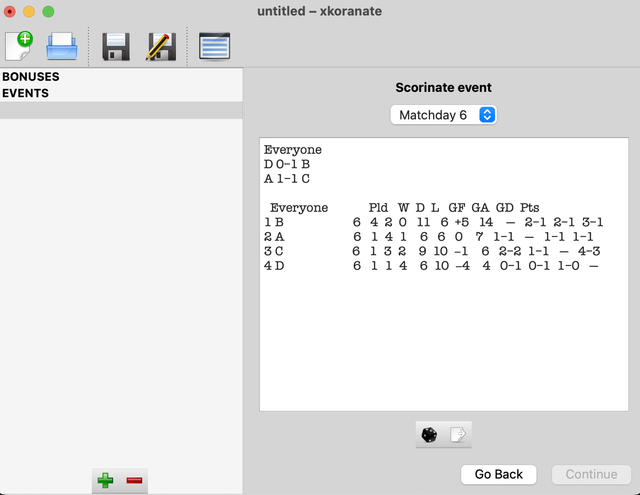
by Jiangbei » Thu Oct 09, 2025 3:44 am
by Sel Appa » Mon Oct 13, 2025 10:26 pm
Jiangbei wrote:I would like to announce that I have managed to edit the source code, compile this scorinator on my laptop, open the app, and run xkoranate successfully (Apple M chip on MacOS Sequoia 15)
([url=https://i.ibb.co/k2z61cRP/xkoranator.png]Image)[/url]

by Borschtslatvia » Sun Oct 19, 2025 7:35 am
Jiangbei wrote:Download link for macOS (both Apple Silicon and Intel) is here. This should be the exact same as version 0.3.3
The current main repository of xkoranate is at https://github.com/NS-Sports/Xkoranate-CE, the version I made is at https://github.com/bohaska/Xkoranate-CE

by Cobrio » Mon Oct 20, 2025 1:21 am
Jiangbei wrote:Download link for macOS (both Apple Silicon and Intel) is here. This should be the exact same as version 0.3.3
The current main repository of xkoranate is at https://github.com/NS-Sports/Xkoranate-CE, the version I made is at https://github.com/bohaska/Xkoranate-CE
Sel Appa wrote:Jiangbei wrote:I would like to announce that I have managed to edit the source code, compile this scorinator on my laptop, open the app, and run xkoranate successfully (Apple M chip on MacOS Sequoia 15)
([url=https://i.ibb.co/k2z61cRP/xkoranator.png]Image)[/url]
Any idea if that would work in Linux??
Borschtslatvia wrote:Jiangbei wrote:Download link for macOS (both Apple Silicon and Intel) is here. This should be the exact same as version 0.3.3
The current main repository of xkoranate is at https://github.com/NS-Sports/Xkoranate-CE, the version I made is at https://github.com/bohaska/Xkoranate-CE
Yay!
Now if I can only find a tutorial on how to use it, I can host a Pig Racing event someday.

by Anjan Kloss » Sat Oct 25, 2025 8:17 pm
Jiangbei wrote:I would like to announce that I have managed to edit the source code, compile this scorinator on my laptop, open the app, and run xkoranate successfully (Apple M chip on MacOS Sequoia 15)
([url=https://i.ibb.co/k2z61cRP/xkoranator.png]Image)[/url]
by Free Republics » Sat Oct 25, 2025 9:01 pm
Anjan Kloss wrote:Jiangbei wrote:I would like to announce that I have managed to edit the source code, compile this scorinator on my laptop, open the app, and run xkoranate successfully (Apple M chip on MacOS Sequoia 15)
([url=https://i.ibb.co/k2z61cRP/xkoranator.png]Image)[/url]
As a Mac user, I really appreciate you making this! The only slight problem I have with it, is that I can't seem to find basketball on it lol? Is it under a different name or something? Or is it a me issue?
Users browsing this forum: No registered users


